
 Academic Calendar
 Blackboard
 One Drive
 School Email
 Course Eval
 Library
 Moodle
 Student Portal
 Forms
Forms Printing System
 Well Connect
 Catalog
 Store
Store Library
 Student Portal
 Printing System
 Well Connect
 Catalog
Dear San Diego and Online Students,
Registration for the Spring 2026 term will start on Monday, March 2nd, 2026, at 9:00 am PST.
The Spring 2026 Schedule of Courses will be available in your student portal on February 23rd.
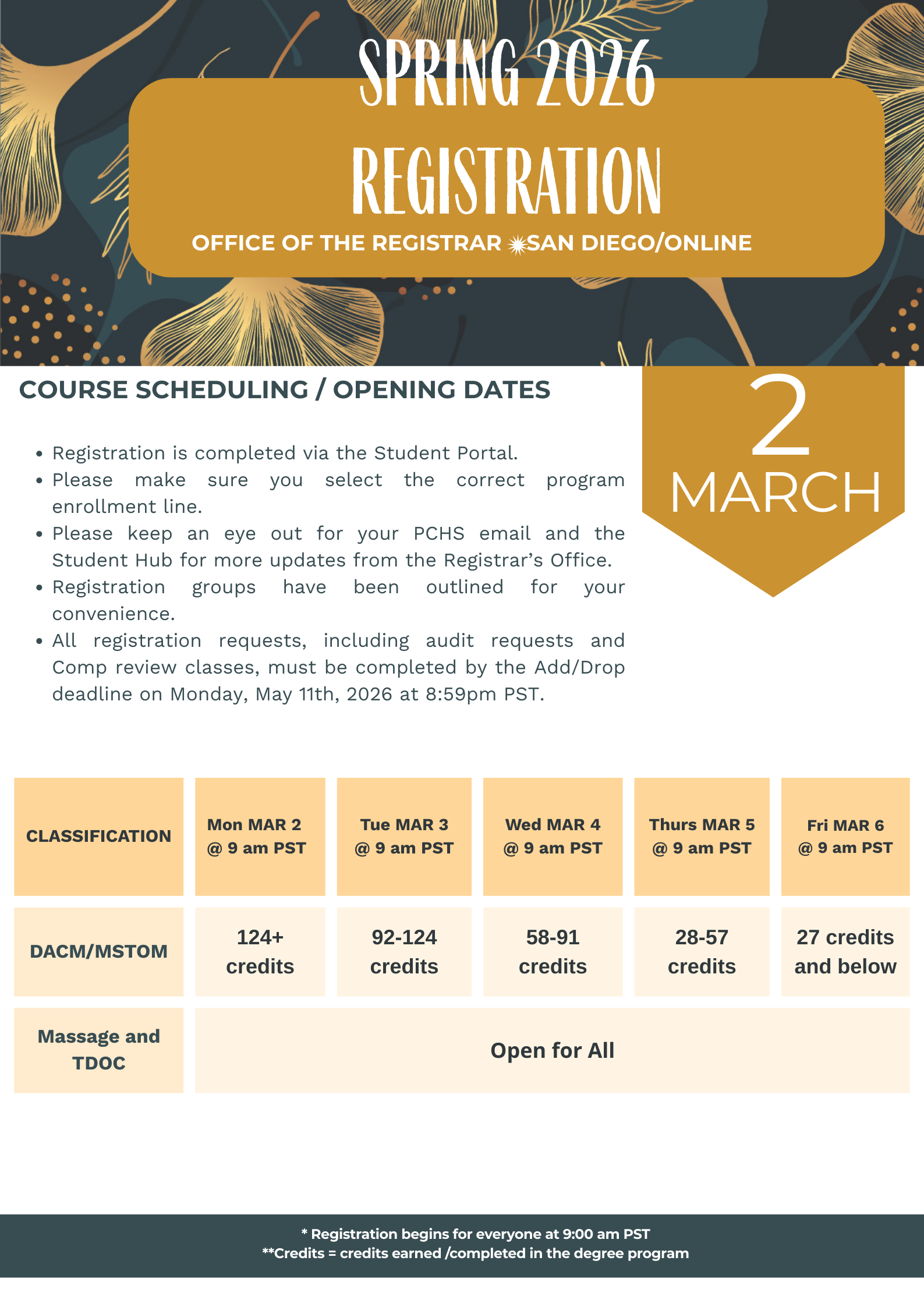
Reminders for Spring 2026
Everything clinic-related will be found on this website: https://clinicclasses.pacificcollege.edu/
Please remember that clinic registration is a TWO-STEP process. Only completion of these two steps will secure your place on your clinic shift.
Step 1: Complete registration for the clinic course, (through your student portal)
Step 2: Complete your Clinic Shift Placement Form under the “Clinic Shift Registration and Sign-up” tab https://clinicclasses.pacificcollege.edu/
*You will not be able to complete this second step until you have first registered for the clinic course
If you currently have a hold on your account, please contact the office/department responsible for that hold to inquire about the removal process and any necessary steps to resolve the issue.
They will be able to guide you through the specific requirements and timeline for the hold’s removal.
- HOLD AD – Registration – [email protected] or [email protected]
- HOLD Bursar – Registration / contact [email protected]
- HOLD ADMISSIONS – Missing Documents / contact [email protected]
- HOLD LIBRARY / Contact: [email protected]
Registration Issues / Forms If you are not able to add a course via the Student Portal – submit an add/ drop form. Add/ drop forms are found in the Student Hub, Forms menu. Add drop forms require the full course code letters, numbers, a period and the section number. Without this code the form will not submit! If you cannot add a course due to an pre-req error message, please submit a Course Out of Sequence petition form.
Most electives (courses with a course code beginning with the letters SE )- require you to submit and add/ drop form.
To audit a course (or clinic course) you must submit an add / drop form. We begin processing Audit requests Monday April 6th, 2026. We cannot waitlist an audit request.
Things to Keep in Mind
Registration Process
- Use a desktop for the best registration experience.
- Courses are offered on a first-come, first-served basis.
- Courses in progress do not count towards the total number of completed credits for registration.
- Complete the registration process by clicking “Register/Drop” and then “Register/Drop” again to finalize.
Post-Registration
- Review your registration and schedule on Moodle and in the student portal after completing the process.
- Ensure all forms, including course code and section number, are fully completed. Incomplete forms will be returned, causing delays.
Waitlisting and Auditing
- Add yourself to the waitlist through the Student Portal. You will be notified when a seat becomes available. Check for schedule conflicts regularly.
- You must submit an add/drop form to audit or register for a secondary elective. Audit and secondary elective registration starts on Monday, April 6th, 2026. Auditing is not possible if no seats are available.
Technical and Advising Support
- If this is your first time registering, follow the “How to Register/Unregister from Courses” tutorial guide.
- For technical assistance, submit a ticket or use the chat function.
- For advising, please email [email protected] or [email protected] for guidance.
Dropping a Course
- To drop a course, you must click on the minus sign next to the course code and keep clicking through all the steps until the course no longer displays on any of your registration screens.
- Course in “PENDING DROP” status have not been dropped!
- Courses in Pending drop status will remain on your schedule and tuition bill.
- If you need assistance with dropping a course, you can submit an add/drop form.

 Online Shop